
- what the caller and your teammate hear during a transfer
- how the agent decides who to ring
- how to set up delegation criteria, so each call reaches the right person
- what happens when nobody can take the call
In this guide, the AI agent is called Zara. Yours answers under the name set in agent setup.
How it differs from a regular transfer
What a transfer sounds like
The example below follows one call. Jane Smith calls your clinic about a bill, and Sarah from your billing team takes the call.1
Jane asks to speak with someone
Jane says, “Can I talk to someone about my bill for last week’s MRI?” If a caller asks for “someone” without saying why, Zara first asks what the call is about, so the teammate who answers knows what to expect.
2
Zara chooses who to ring
Zara compares Jane’s request with what each teammate handles, and rings everyone who deals with billing at the same time. See Who gets rung.
3
Jane stays on the line
Zara says something like, “I’m reaching someone from our billing team for you, and I’ll connect you as soon as they pick up.” If the phones ring for a while, she lets Jane know they are still ringing.
4
Sarah hears who is calling
Sarah’s Z360 app rings, showing Jane’s number, as with any incoming call. When she answers, she hears a short introduction, such as:
“Call from Jane Smith. Jane Smith is asking about a recent bill. Press 1 to take this call, or 2 to decline.”The introduction gives Sarah what she needs to decide and leaves out private details, such as the MRI. Jane does not hear it.
5
Sarah presses 1
The other billing phones stop ringing. Zara tells Jane, “I’m connecting you with Sarah now,” and the two are connected. Zara then leaves the call.
Pressing 2, hanging up, or not pressing a key declines the call for that teammate only. Everyone else being rung keeps ringing. If two teammates answer at about the same time, both hear the introduction, and the first to press 1 takes the call.
Who gets rung
Zara decides who to ring from what the caller asks for:- The caller asks for someone by name. Zara rings that person. If nobody on your team has that name, she asks the caller who they meant, or whether someone else could help.
- The caller describes what they need. Zara rings every teammate whose delegation criteria match the request, all at once. The first to accept takes the call.
- Nobody’s criteria match, or none have been added yet. Zara rings everyone on your team who is available.
Set up warm transfers
There is one thing to set up: delegation criteria, a short description of the calls each teammate handles. Zara reads these descriptions to decide who to ring.Add delegation criteria to a teammate
1
Open your team
Go to Settings > Team & Security > Team Members.
2
Edit the teammate
Click the three-dot menu on the teammate’s card and select Edit Member.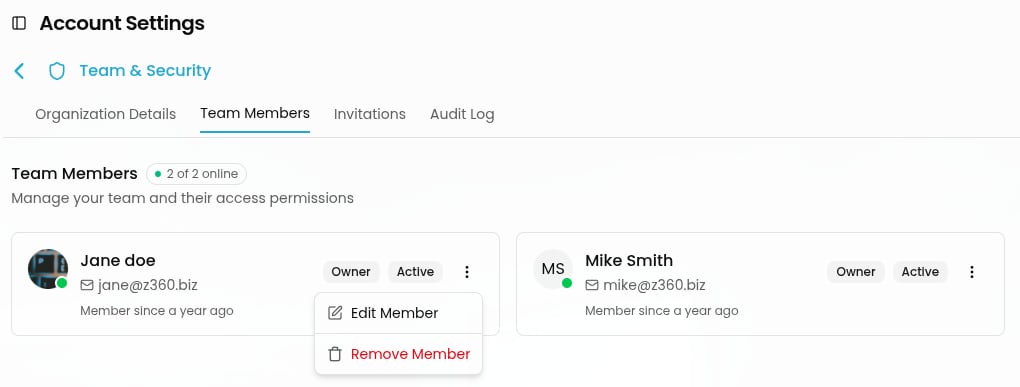
3
Describe what they handle
In Delegation criteria, describe the calls this person should take, in plain language.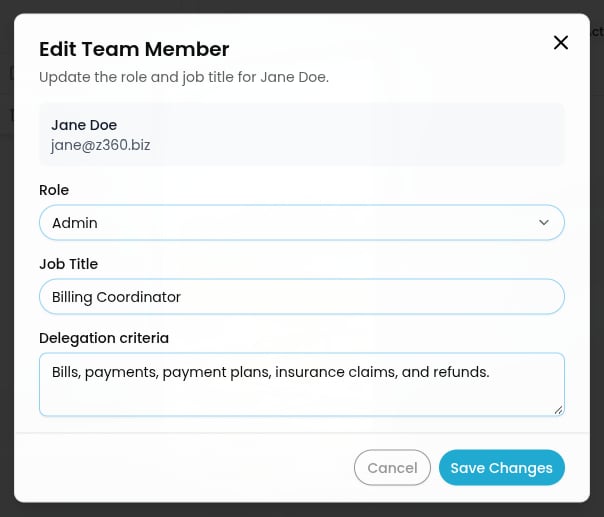
4
Save
Click Save Changes. The new criteria apply from the next call onward.
Write criteria that work
Zara compares what the caller needs with each teammate’s description, so write criteria the way a caller would describe their problem. A list of topics works better than a job title.
Several teammates can share the same topics. When a request matches more than one person, Zara rings them together, and whoever accepts first takes the call.
Before your first transfer
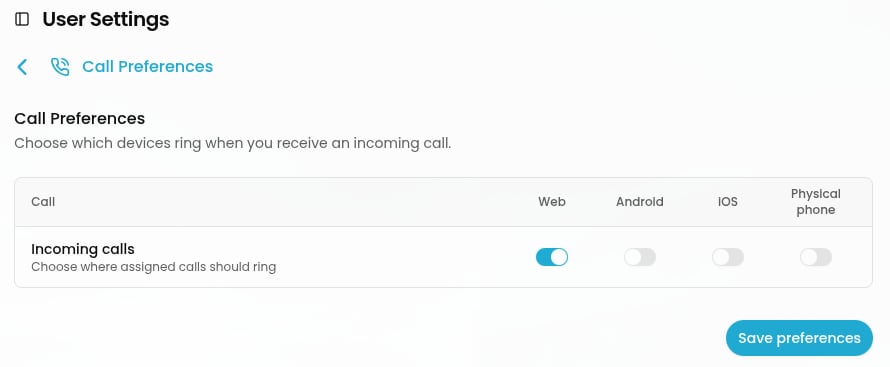
- Make sure your team’s phones ring. Each teammate who should take transfers needs at least one device turned on in their call preferences: the web app, the mobile app, or a desk phone.
- Check your working hours. Transfers happen only during the hours set in Settings > Phone > Availability. Outside those hours, Zara takes a message instead. See Phone Availability Settings.
When nobody can take the call
If nobody answers, everyone declines, or the call comes in outside your working hours, the caller is not sent to voicemail or left on hold. They are still talking to Zara, who:- lets them know nobody is available right now,
- offers to take a message, and
- creates a ticket describing what the caller needs, so your team can follow up.
After the call
The call appears in your Inbox like any other call:- The call card shows the teammate who took the call.
- When call recording and transcription are on, the transcript includes both the conversation with Zara and the conversation after the transfer.
- If nobody took the call, the ticket Zara created is waiting for your team.
Frequently asked questions
Do I have to add delegation criteria?
Do I have to add delegation criteria?
No. Without delegation criteria, Zara rings everyone on your team who is available whenever a caller asks for a person. Adding criteria means callers reach the right person sooner and fewer people are interrupted.
Does the caller hear the introduction?
Does the caller hear the introduction?
No. Only the teammate who answers hears it. The caller stays with Zara until a teammate accepts.
What does the introduction include?
What does the introduction include?
The caller’s name, when they are a known contact, and one sentence about what they need. Zara leaves out medical, financial, and other private details the teammate does not need in order to decide.
Can a teammate decline a call?
Can a teammate decline a call?
Yes. Pressing 2, hanging up, or not pressing a key declines the call for that teammate only. Anyone else being rung keeps ringing.
What happens if two teammates answer at the same time?
What happens if two teammates answer at the same time?
Both hear the introduction. The first to press 1 takes the call. The other hears “Someone else has taken this call” before their line closes.
What if the caller doesn't want to say why they are calling?
What if the caller doesn't want to say why they are calling?
That’s fine. Zara asks once and does not insist. She transfers the call anyway and lets the teammate know the caller preferred not to say.
What if the caller asks for someone who isn't on our team?
What if the caller asks for someone who isn't on our team?
Zara doesn’t guess. She asks the caller who they meant, or whether someone else on the team could help.
Can a caller be transferred more than once during a call?
Can a caller be transferred more than once during a call?
If a transfer doesn’t connect and the caller asks again later in the call, Zara tries again. She does not retry on her own.
A teammate's phone didn't ring. Why?
A teammate's phone didn't ring. Why?
Check that:
- they have at least one device turned on in their call preferences,
- they weren’t already on another call,
- the call came in during your working hours, and
- their delegation criteria cover what the caller asked for. If other teammates’ criteria matched the request better, Zara rang them instead.
Related guides
Phone routing and E-911
Choose how inbound calls reach your team and your AI agent.
Call preferences
Choose which of your devices ring for incoming calls.
Manage tickets
Follow up on messages Zara took for the team.
View conversation details
Review call recordings, transcripts, and call history.